TripIt vs Wanderlog in 2026: Which Fits How You Plan (and When a Spreadsheet Beats Both)
TripIt vs Wanderlog: compare booking imports, maps, group planning, offline access and current Pro pricing to choose the right trip planner for you.
By Ultimate Travel Planner by Cosmo Suite · Editorial policy
Published · 8 min read

One person forwards hotel confirmations. Someone else drops restaurant pins on a map. By the time the group leaves, the plan is in three places and the latest flight time is in an email.
TripIt and Wanderlog both collect trip details, but they organize them around different jobs. TripIt starts with bookings and travel updates. Wanderlog starts with places, maps and a plan people can edit together.
Choose TripIt if email import and flight alerts matter most. Choose Wanderlog if you want a map-centered itinerary and shared planning. If you need a file that ties each day's bookings to a budget and packing list, a spreadsheet may fit better. Here is where each option works well, plus where it stops.
The Plan in Brief
- TripIt turns forwarded booking confirmations into an itinerary and adds flight alerts with Pro.
- Wanderlog puts places on a map and supports shared itinerary planning; some features require Pro.
- Price: TripIt Pro is listed at $49 per year. Wanderlog's U.S. App Store lists several in-app prices, so check the amount shown for your account.
- A spreadsheet gives you more control over the file and its day-by-day structure, but no maps, email import or flight alerts.
What each app is built to do
TripIt is strongest when the trip begins as a pile of confirmations. Forward a booking email or connect inbox sync, and TripIt can turn the details into a single itinerary. Its free plan includes plan organization, sharing, calendar sync and mobile access. Pro adds live flight alerts, alternate flights, check-in reminders and other travel updates, according to TripIt's feature comparison.
Wanderlog is strongest when you are deciding where to go each day. Its itinerary and map sit together, and its official site lists collaboration, reservations, budgeting, packing checklists and route optimization among its features. The core planner is free. Wanderlog Pro adds features such as offline access, automatic Gmail scanning and route optimization, as described on its Pro page.
TripIt is a booking-first travel organizer. Wanderlog is a map-centered trip planner. If your main job is getting reservations into one place, TripIt removes the manual entry. If the trip still needs a route and shared choices, Wanderlog gives the group a map and a common plan.
If you already plan in a sheet, compare the apps with a travel planner spreadsheet that keeps bookings beside each day. That view is useful when dates, stays and daily plans need to line up. A trip itinerary spreadsheet with bookings beside the days is another format to consider.
A booking detail should lead to the right day
An itinerary is useful when a reservation is easy to find at the moment you need it. Consider a hotel change: you need the new address, the night it applies to and the next day's plan. A booking list and a day-by-day view answer different parts of that question.
In the Ultimate Travel Planner sample, the Bookings tab holds the reservation once, and the itinerary shows where the travellers stay that night. The Day Plan puts one date on its own page. The example below is a genuine capture from the sample trip, not a screen from TripIt or Wanderlog.
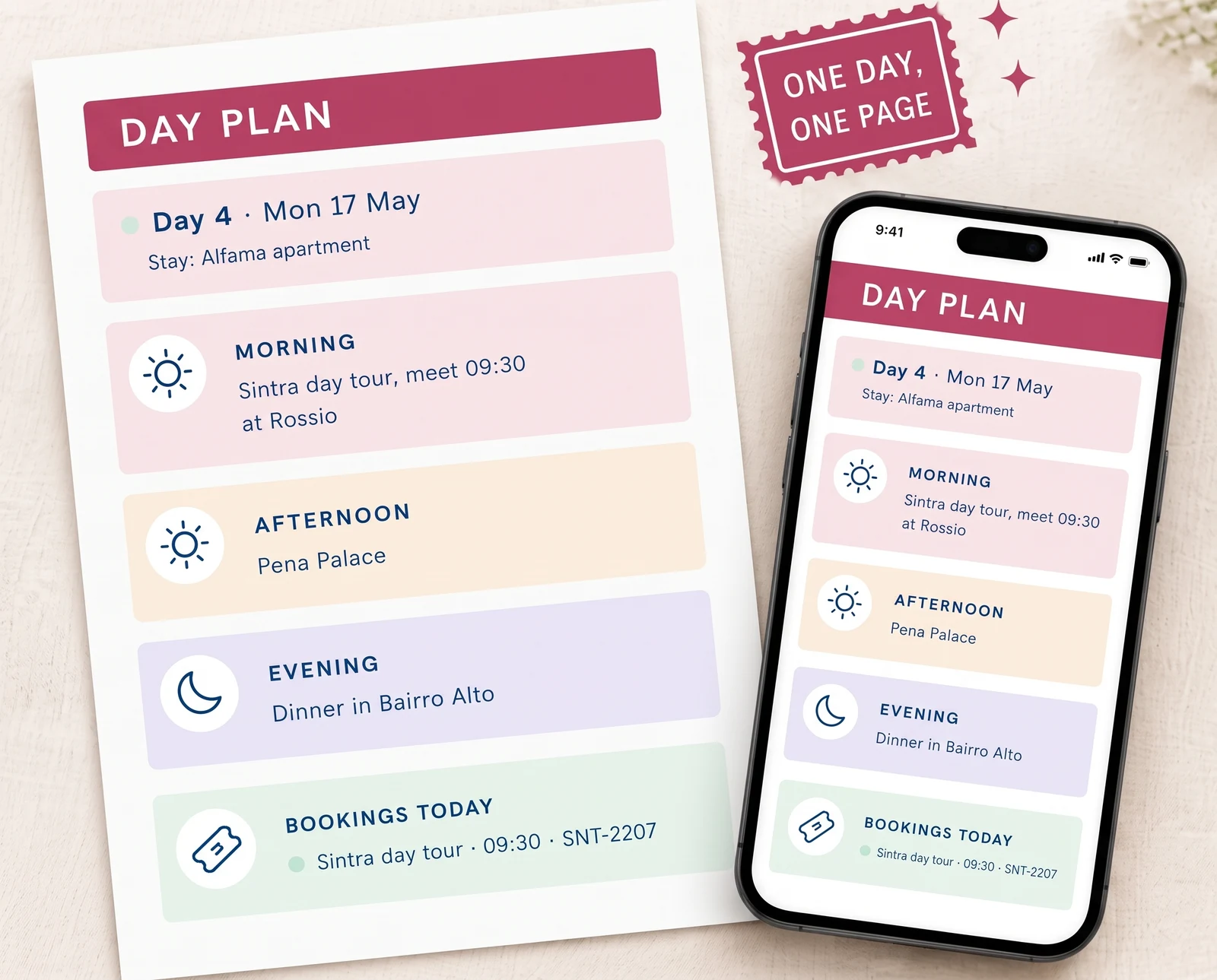
TripIt organizes its itinerary from imported and manually added plans. Wanderlog combines reservations with places and a map. Neither product page claims the same spreadsheet-style connection between one booking record, its day, a budget category and a reusable packing list. That is a different job from routing or flight monitoring.
For another view of how dates and reservations sit together, see this seven-day travel itinerary example. Use it to decide whether you need one trip timeline, a map, or both.
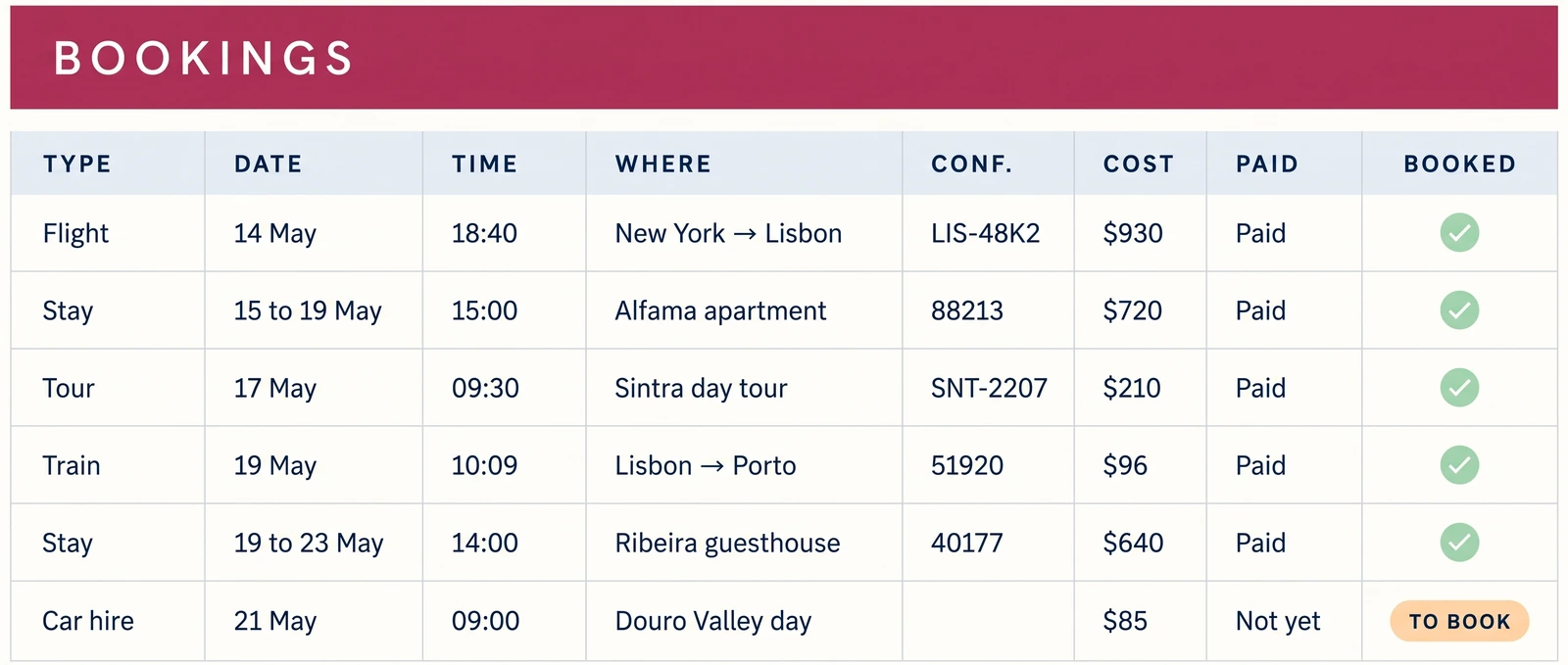
The sample keeps the booking details in one list. It is a useful contrast with an email-first app: the spreadsheet owner enters each reservation, then checks the date and cost in the plan. That setup gives you control over the fields, with more manual work at the start.
The Lisbon and Porto sample covers 10 days for two travellers and has nine booking rows. A map-led app can help you see where a stop fits; the spreadsheet view helps you see what is booked on each date and how its cost reaches the budget. Those views solve different parts of the same trip. If you keep both, choose one as the record to update when a time or stay changes. Otherwise you may need to correct the same detail twice.
TripIt vs Wanderlog: which fits your trip?
The better choice depends on the work you want the app to take off your hands. This comparison uses current vendor feature pages and does not claim a hands-on test of either app.
| Need | TripIt | Wanderlog | Better fit |
|---|---|---|---|
| Add flight and hotel confirmations | Forward email or sync inbox | Forward bookings; automatic Gmail scanning with Pro | TripIt for automatic organization; Wanderlog if the map matters too |
| See places and route | Transportation options and maps | Places, itinerary and map together; route optimization with Pro | Wanderlog for building a route |
| Plan with other travellers | Share trip plans | Real-time collaborative editing | Wanderlog for active group planning |
| Track trip costs | No budget feature listed on the current comparison page | Budgeting and expense tracking listed | Wanderlog |
| Use details offline | Trip details in its mobile app | Offline trip access with Pro | TripIt for included itinerary access; Wanderlog Pro for map-led offline use |
| Get flight changes | Real-time alerts and alternate flights with Pro | Live flight updates listed; check which features need Pro | TripIt for its documented alert and rebooking tools |
| Keep a one-time file | Not its product model | Not its product model | Spreadsheet |
Wanderlog takes more categories where the work is visual or shared: maps, group edits and budgets. TripIt has a clearer advantage when confirmation emails and flight changes drive the trip. For a traveller who mainly wants one place to read confirmed reservations, TripIt's free tier may be enough; the map and shared itinerary make Wanderlog more useful for building the days together.
The final row matters if you want to keep the plan outside an account. Neither app is a downloadable spreadsheet with connected booking, budget and packing tabs. For that, consider a trip itinerary template you can edit in Sheets or Excel.
If you are unsure, compare them with one small trip before adding every reservation. Create a test trip, add one flight and one stay, then invite the person who will check the plan with you. Look at the same details in each app: can you find the next booking, see where it lands in the day, and spot a change without searching email again? Then open the map and budget. This reader-run fit check keeps the decision tied to your trip. The comparison above uses vendor-published features rather than app testing.
How much do the paid plans cost?
TripIt Pro is listed at $49 per year on TripIt's pricing page, checked 26 October 2026. TripIt itself remains free. Pro is mainly for alerts and changes: flight notifications, alternate flights, fare monitoring and airport guidance.
Wanderlog's core planner is free, and Pro unlocks offline access, Gmail auto-scanning, route optimization and other features. Its U.S. App Store listing shows multiple in-app purchase amounts rather than one price that applies to every listing. The web Pro page did not expose a single current amount in the page content available for this check, so review the price in your app or checkout before subscribing. Prices and offers can vary by store and account.
For occasional trips, start with the free version of either app. Pay only if a Pro feature solves a problem you have on the next trip. TripIt's annual price is easy to compare with your expected use; Wanderlog needs a quick checkout check because the store listing shows more than one amount.
Which one should you choose?
Choose TripIt if most of your trip details arrive by email and you want an itinerary without typing every reservation. Pro makes more sense when flight alerts, alternate flights or airport guidance are features you will use.
Choose Wanderlog if your group needs to suggest places, arrange days on a map and keep a shared itinerary. Try the free plan first. Add Pro if you need offline access, route optimization or automatic Gmail scanning.
Choose a spreadsheet if you want to control the file and see bookings, days, costs and packing in one structure. The Ultimate Travel Planner (ultimatetravelplanner.site) is a trip itinerary spreadsheet with 12 connected tabs in Google Sheets and Excel, a Lisbon and Porto sample, a clean copy and two printable pages. It supports trips up to 60 days and eight travellers. You enter the exchange rate yourself; it does not import booking emails, show maps or send flight alerts.
The planner costs $9 once. If maps, inbox import or live flight information are the main job, stay with the app that covers it.
Why Trust This Article
The Cosmo Suite team built the Ultimate Travel Planner and has a clear interest in spreadsheets. This comparison is research-based, not a hands-on test of TripIt or Wanderlog. We checked TripIt's pricing and feature pages, Wanderlog's official site and Pro page, its help center and its U.S. App Store listing on 26 October 2026. Feature availability and prices can change. Product details about the spreadsheet come from its published contents. See our About page and editorial policy for how we prepare and correct posts.
What the Ultimate Travel Planner includes
The Ultimate Travel Planner is a spreadsheet for travellers who want a day-by-day plan and its bookings, budget and packing list in one file. Its 12 connected tabs are available in Google Sheets and Excel, with a sample trip and a clean copy. The two printable pages are a one-day plan and a packing checklist.
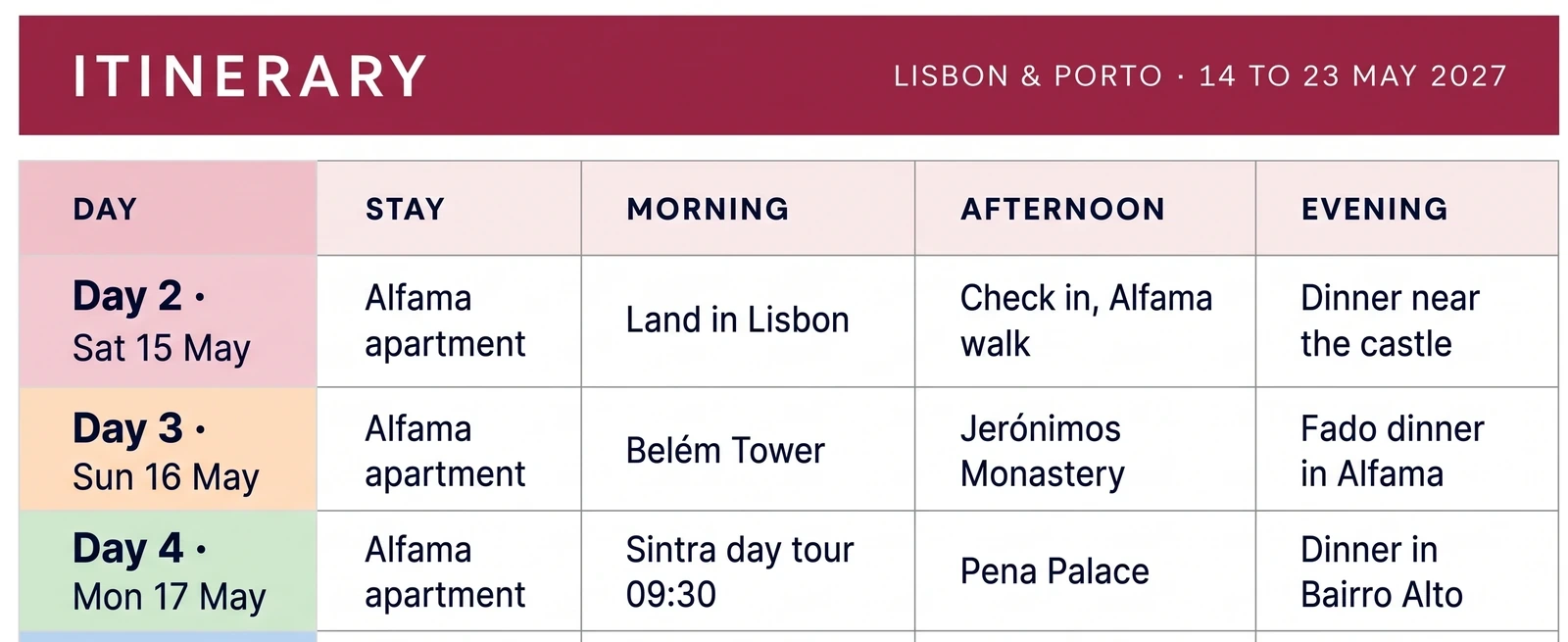
This preview shows how a spreadsheet can keep the trip's dates and daily blocks together. It is a sample workbook image, not a TripIt or Wanderlog screen.
It will not import email, update currency rates live, show a map or send flight alerts. Those are real reasons to choose TripIt or Wanderlog. The spreadsheet fits when you would rather keep the plan in a file you own, with booking costs appearing in the budget and the master packing list ready for your next trip.
Frequently asked questions
Is TripIt better than Wanderlog?
TripIt is a better fit when email booking import and flight alerts are your main needs. Wanderlog fits map-based itineraries, shared planning and budgets. Pick by the task you want the app to handle most.
Is Wanderlog free to use?
Yes. Wanderlog says its core trip planner is free, including shared planning. Pro adds features such as offline access, route optimization and automatic Gmail scanning. Check the price shown in your store before subscribing.
Does TripIt work offline?
Yes. TripIt says you can view trip details offline in its mobile app. Enhanced interactive airport maps need an internet connection the first time you open them.
Can I use TripIt and Wanderlog together?
You can keep separate plans in both, but that means maintaining two versions. Choose one as the source of truth, then use the other only for a specific feature such as maps or flight updates.
When should I use a spreadsheet instead of a travel app?
Use a spreadsheet when you want a file you control and a day-by-day plan tied to bookings, budget and packing. It will not import confirmation emails, show maps or send flight alerts.
