Travel Itinerary Example: A 7-Day Trip, Every Block Filled In
Travel itinerary example: use a seven-day Lisbon and Porto plan with daily stays, three time blocks, and bookings marked confirmed or still open.
By Ultimate Travel Planner by Cosmo Suite · Editorial policy
Published · 8 min read

The flights are booked. A hotel confirmation is sitting in your inbox, but your itinerary still starts with an empty grid. A blank grid does not tell you which details come first.
Start with the fixed details: dates, stays, flights, tours and timed transport. Then place the rest of each day around them. This travel itinerary example shows seven consecutive days from a real ten-day Lisbon and Porto sample. It puts the stay, morning, afternoon, evening and dated bookings in one view, so you can borrow the structure for your own trip. If you want a trip itinerary spreadsheet with bookings beside each day, the same sequence works there too.
A travel itinerary example is a dated schedule that shows where you stay, what you plan to do, and which details are already booked.
The Plan in Brief
- Start with the reservation that fixes a date or time.
- Give each day a stay and three simple time blocks.
- Keep confirmed bookings separate from planned activities.
- Leave open time visible instead of filling it with guesses.
Put fixed bookings in first
The reservations set the shape of a trip. In this sample, the flight to Lisbon leaves on Friday 14 May 2027 at 18:40. The Alfama apartment covers 15 to 19 May. A Sintra day tour is set for 17 May at 09:30. On 19 May, a 10:09 train moves the travelers to Porto, where the Ribeira guesthouse covers the next four nights.
Those details answer practical questions before you add sightseeing. Which nights belong to each stay? Which morning already has a departure? When does the group change cities? Put a booking on the day it affects, and keep its time visible. If a reservation lasts several days, show its dates in the booking record and the stay in each daily block.
The example has eight bookings marked booked and one car hire marked “to book.” The car hire is planned for 21 May at 09:00, but the sample marks it as unconfirmed. The label tells you it still needs action. You can include an idea before you reserve it, as long as the status stays clear.
For international trips, keep document checks on a separate pre-trip list. The U.S. Department of State's International Travel Checklist covers steps such as checking passport and destination requirements. It is a reference for your own preparation, not a substitute for checking the rules that apply to your trip.
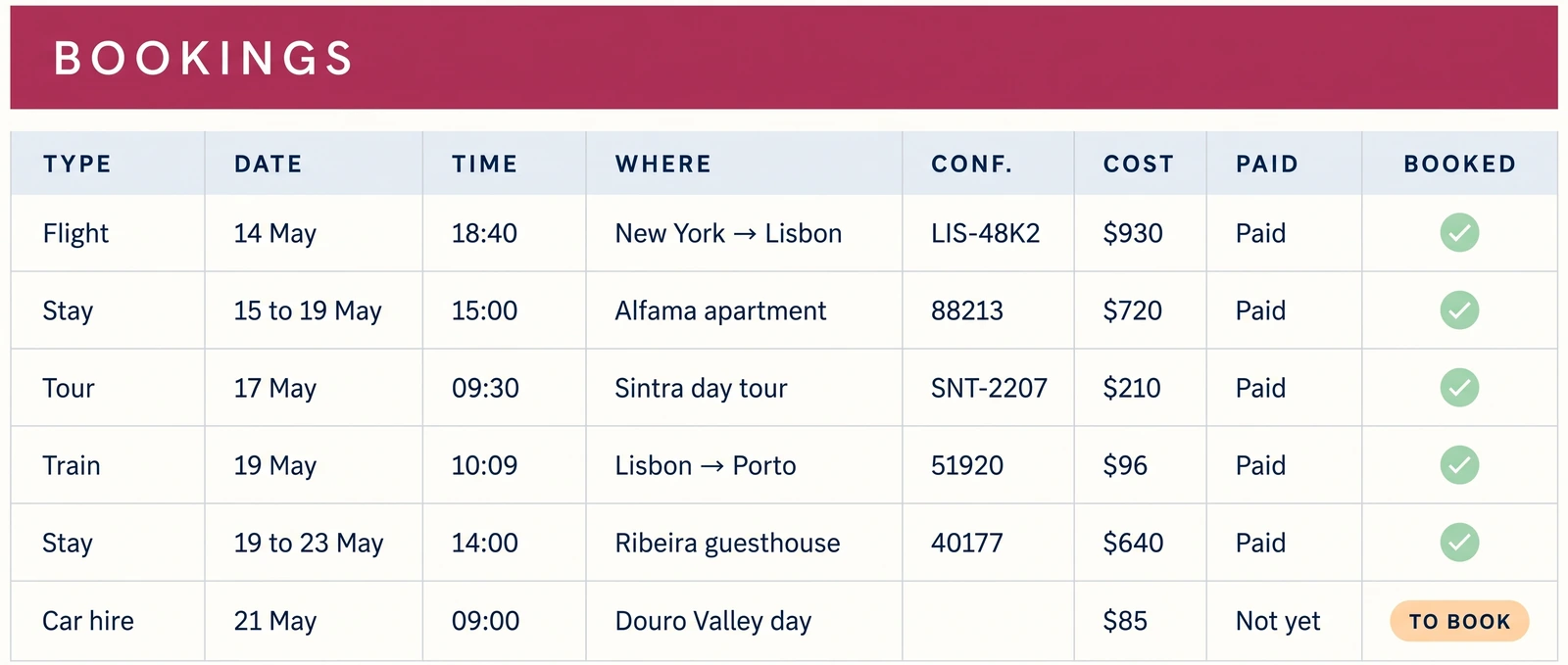
A 7-day travel itinerary example, filled in
Here is the first week of the ten-day Lisbon and Porto sample. Every row comes from the sample itinerary. The booking label names only dated reservations in its Bookings list. A place or activity in another column is a plan, not proof of a ticket reservation.
| Day and stay | Morning | Afternoon | Evening and fixed booking |
|---|---|---|---|
| 1 · Fri 14 May · Overnight flight | Pack and check in online | Leave for the airport | Flight to Lisbon, 18:40. Booking: flight, 18:40 |
| 2 · Sat 15 May · Alfama apartment | Land in Lisbon | Check in, Alfama walk | Dinner near the castle. Booking: stay, 15 to 19 May |
| 3 · Sun 16 May · Alfama apartment | Belém Tower | Jerónimos Monastery | Fado dinner in Alfama. Booking: stay, 15 to 19 May |
| 4 · Mon 17 May · Alfama apartment | Sintra day tour, 09:30 | Pena Palace | Dinner in Bairro Alto. Booking: Sintra tour, 09:30 |
| 5 · Tue 18 May · Alfama apartment | Tram 28 | São Jorge Castle | Sunset at the viewpoint. Booking: stay, 15 to 19 May |
| 6 · Wed 19 May · Ribeira guesthouse | Train to Porto, 10:09 | Check in, river walk | Dinner in Ribeira. Booking: train, 10:09; stay, 19 to 23 May |
| 7 · Thu 20 May · Ribeira guesthouse | São Bento Station | Clérigos Tower | Dinner, 20:00. Booking: dinner, 20:00; stay, 19 to 23 May |
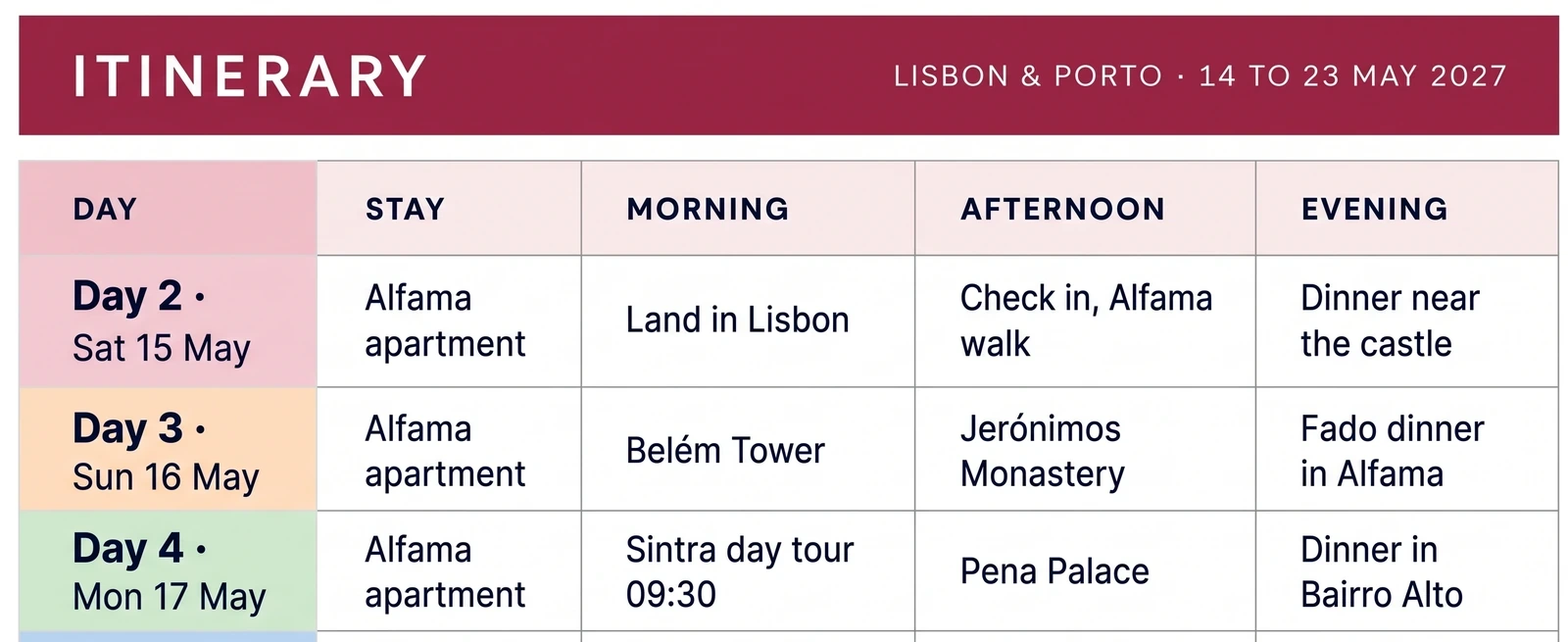
This is an excerpt, not a separate seven-day trip. The full sample runs from Friday 14 May to Sunday 23 May 2027, for two travelers, Maya and Sam. Days eight to ten continue the Porto stay and the return flight. The example above stops after day seven because it is enough to show the change from arrival, to a city base, to a transfer and a second base.
What the seven days show
Dates and stays anchor the trip. Morning, afternoon and evening hold the plan for each day. The last column shows which reservations already have a date or time.
Day one is not a sightseeing day. It contains the airport departure and evening flight. Day two starts after arrival, with check-in and a walk. The plan makes that a different kind of day from day three, which has two named places and a dinner plan. You can see the difference without reading a paragraph of notes.
Day four has the clearest timed activity: the 09:30 Sintra tour. The sample's booking list also records the meeting point and confirmation number. Pena Palace and dinner remain in the itinerary's afternoon and evening blocks. The table does not claim that those plans are reservations. That is a useful distinction when a trip changes. A booked time needs an update if it moves; an idea can move with less cleanup.
Day six is the transfer. The 10:09 train is the anchor, and the new stay is the Ribeira guesthouse. Check-in and a river walk follow in the afternoon. The day does not pretend that the train is spare time for another long activity. Day seven then starts from the Porto stay, with two named stops and a 20:00 dinner booking.
The sample makes the difference clear: arrival, city days, an excursion and a transfer each use the day differently. For a day-by-day layout that ties stays to bookings, see this filled-in travel itinerary template.
How to adapt the example for your trip
Make a copy of the table, then replace the sample details in a steady order. First enter your trip dates and the nights at each stay. Next list flights, train or bus times, booked tours and any timed meal. After that, add the places or activities you want around those commitments.
Use the same questions for each day:
- Where will I sleep that night?
- What is already booked, and what time is it?
- What is the plan for the morning, afternoon and evening?
- Which item is still only an idea or still needs booking?
For a family trip, keep addresses and a separate packing list. For two cities, make the transfer day clear. A weekend with one hotel and two reservations may need only the dates, stay and a few plan blocks.
If you are using a spreadsheet, keep one source for each fact. Put a hotel confirmation in Bookings once, then show the stay on the nights it covers. Put a timed tour in Bookings once, then show it on that day. If you type the same address or number into several independent rows, a change can leave one copy behind.
For the Google Sheets version, the setup guide for a travel itinerary in Google Sheets walks through dates, the first booking and the Day Plan view. The same layout works on paper or in a document. Enter the fixed items, add the flexible plans, then look for gaps.
Keep one day readable on the move
A whole-trip table helps you spot the shape of the week. On travel day, you may want only today's stay, plan and bookings. The Day Plan in the sample puts those details on one page. Day four shows the Alfama apartment, the Sintra tour at 09:30, Pena Palace, dinner in Bairro Alto and the tour confirmation number.
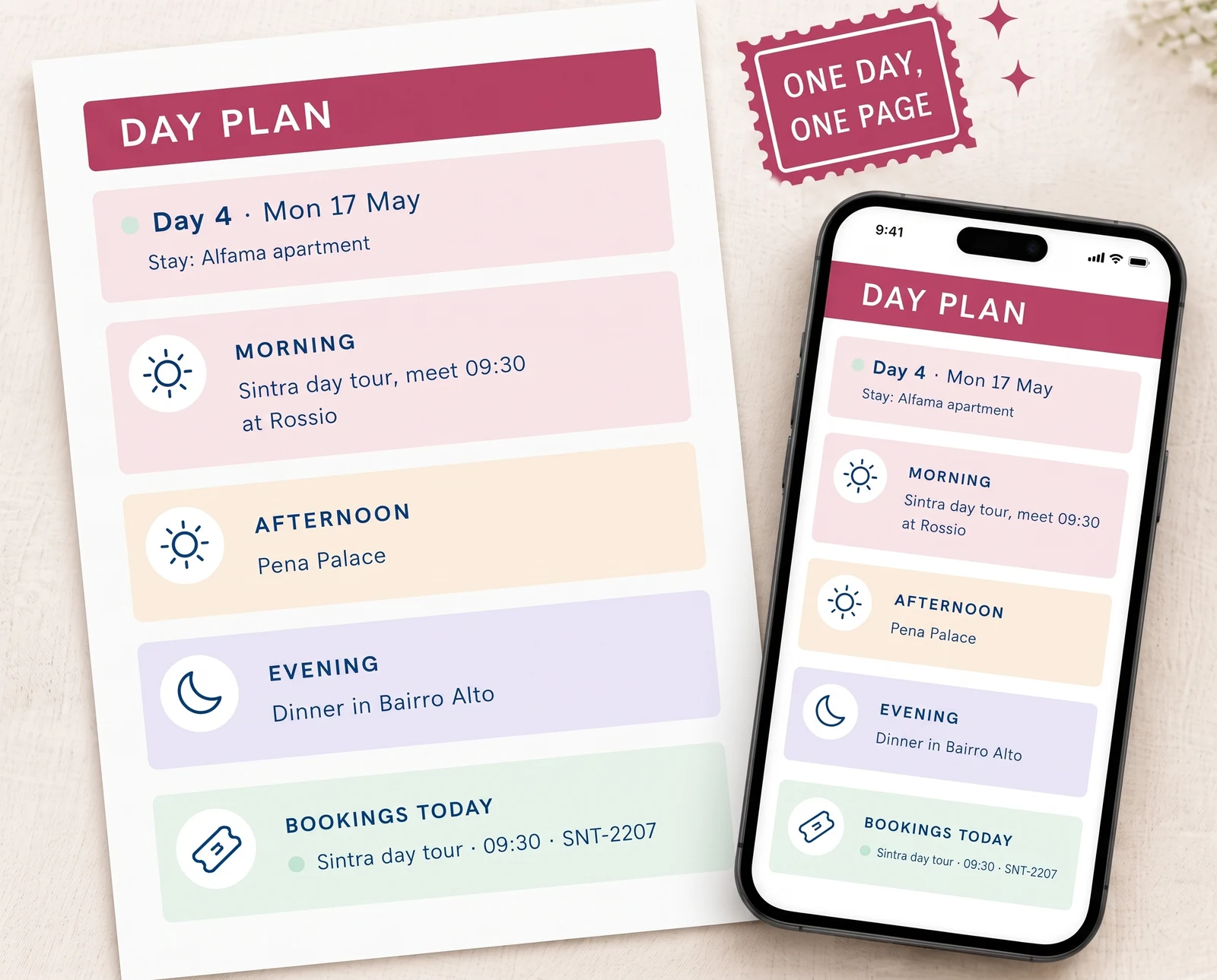
You can also print the one-day view or open it on a phone. If your group shares a Google Drive file, set access deliberately. Google describes the standard roles as viewer, commenter and editor in its file-sharing help. Choose the level each person needs, then point everyone to the same current copy.
For a simple trip, budget, packing and document sections are optional. Add them when you need to keep those details with the itinerary.
The detail many itinerary examples leave out
A useful example shows what is booked, what is planned and what is still open. Those labels stop a polished table from looking more certain than the trip really is.
The sample makes this visible in the car hire row. It has a date, a time and a destination, but the status says “to book.” The plan can still show a Douro Valley day on 21 May, while the booking list makes clear that the car is not reserved yet. If the booking does not happen, the activity can change without making the rest of the itinerary look confirmed.
Try the same labels in your own file: booked, planned, and to book. Keep the label near the activity, not in a separate note that gets lost. For accommodation, one booking can cover several nights. For a tour, the reservation belongs on its date. For open time, leave a short marker such as “free afternoon” so the gap is a choice rather than an oversight.
That simple status check is the step most copyable itineraries skip. It lets another traveler tell whether they need to act, show up, or decide later. A trip itinerary spreadsheet with bookings beside each day can keep those records together, but the same rule works in any format.
Why Trust This Article
The Cosmo Suite team built the Ultimate Travel Planner (ultimatetravelplanner.site) and its filled-in Lisbon and Porto sample. We used its canonical copy sheet for every date, stay, activity and booking shown here. This is a worked spreadsheet example, not a report of a real holiday or destination advice. Google Drive sharing details and the State Department checklist were checked on 22 October 2026. Read about the company. Check your own travel documents, booking times and current requirements before departure.
Where Ultimate Travel Planner fits
The Ultimate Travel Planner at ultimatetravelplanner.site is a trip itinerary spreadsheet with a plan for each day. It has 12 connected tabs in Google Sheets and Excel, with a filled-in sample and a clean copy in each format. The Itinerary and Day Plan put the daily schedule beside its bookings. Other tabs cover the trip overview, budget, spending, packing, pre-trip tasks, places, and documents and contacts. Two printable PDF pages are included: a one-day plan and a packing checklist.
The sample above shows the planner's approach: enter a booking once, then see it on the day it affects. The file does not import bookings from email, make reservations or update currency rates for you. You type the exchange rate. If you want a starting file with the connected tabs already laid out, that is what Ultimate Travel Planner provides. If a basic document covers your trip, you can use the same seven-day pattern there instead.
Frequently asked questions
What should a travel itinerary example include?
Start with the date, where you stay, and a morning, afternoon, and evening plan for each day. Add the fixed bookings beside the day they affect, including times and confirmation details. Keep planned activities visibly separate from confirmed reservations.
How detailed should each day be?
Use enough detail to answer where you will be, what is fixed, and what you plan to do around it. A short phrase for each part of the day is often easier to scan than an hour-by-hour schedule. Leave open time where you have not made a decision.
Should I add bookings before activities?
Yes. Enter flights, stays, timed transport, and reserved activities first. They set the dates and times the rest of the plan must fit around. Then add ideas for the open hours and mark anything you still need to book.
How should a travel itinerary show a transfer day?
Put the departure time and route in the morning or afternoon block, then show the new stay and any fixed check-in detail. Keep other plans light until you know how much time the transfer leaves.
Can I share a travel itinerary with other travelers?
Yes. In Google Drive, choose whether each person can view, comment on, or edit the file. Tell your group which copy is current, and keep one shared version instead of sending a new attachment after every change.
Sources
Keep reading
Itinerary Templates
Travel Itinerary Template: What a Day-by-Day Plan Needs (and a Sample Trip, Filled In)
Travel itinerary template: what a day-by-day plan needs, how to fill one in, and a sample 10-day trip to Lisbon and Porto worked from morning to evening.
· 12 min read

Itinerary Templates
Travel Itinerary Template for Google Sheets: Set Up a Trip, Step by Step
Travel itinerary template Google Sheets setup: six steps from your own copy to the Day Plan on your phone, worked on a 10-day Lisbon and Porto trip.
· 7 min read

Itinerary Templates
Travel Itinerary Template for Excel (Made for Microsoft 365)
Travel itinerary template Excel setup: add dates, format trip costs, then print a readable day plan in Microsoft 365 without shrinking every column.
· 8 min read
