Travel Itinerary Template: What a Day-by-Day Plan Needs (and a Sample Trip, Filled In)
Travel itinerary template: what a day-by-day plan needs, how to fill one in, and a sample 10-day trip to Lisbon and Porto worked from morning to evening.
By Ultimate Travel Planner by Cosmo Suite · Editorial policy
Published · 12 min read
The flights are booked. Now there are eleven confirmation emails, a screenshot of a hotel address, and nobody can say where you sleep on night four.
That is the moment most people go looking for a travel itinerary template. Some want a trip itinerary spreadsheet where the bookings sit beside each day. The usual find is a blank grid: a column for the date, a column for "activity", and nothing tying the plan to what you have paid for. A good itinerary template is the opposite: it is built around the bookings, so the plan can only drift from reality if you let it.
This guide covers what a day-by-day plan needs and how to fill one in. It uses a real sample trip, 10 days across Lisbon and Porto.
The Plan in Brief
- Start with the bookings. Flights, stays and tours have fixed dates. Everything else fits around them.
- One block per day. Morning, afternoon, evening, plus where you sleep that night.
- Let the days read from the bookings. Retyping a hotel address on four different days is how plans go wrong.
- Keep one file per trip. Copy a clean version each time, and anything you want to reuse comes along.
What a Travel Itinerary Actually Has to Do
A travel itinerary is a schedule of where you will be and what you will do, day by day. An itinerary template is a ready-made layout for that schedule. The word covers everything from a one-line note to a printed booklet, which is why templates vary so much.
The job is narrower than the formats suggest, because an itinerary answers four practical questions, and a template is only good if it answers them quickly:
- Where am I sleeping tonight?
- What is booked for today, and at what time?
- What is the plan for the free hours?
- How do I get from this stop to the next?
Everything else on a template, such as colour bands, icons or a packing section, is either decoration or a separate job, and if the four answers are slow to find, the template is not working, however attractive it looks on a listing page.
You also need to be able to share the plan, because whoever else is travelling should be able to open the same version without asking you for it. In Google Sheets, sharing runs on Drive access levels. Viewers can look, commenters can leave notes, and editors can change the file. You decide who may move things around.
A Day From the Sample Trip
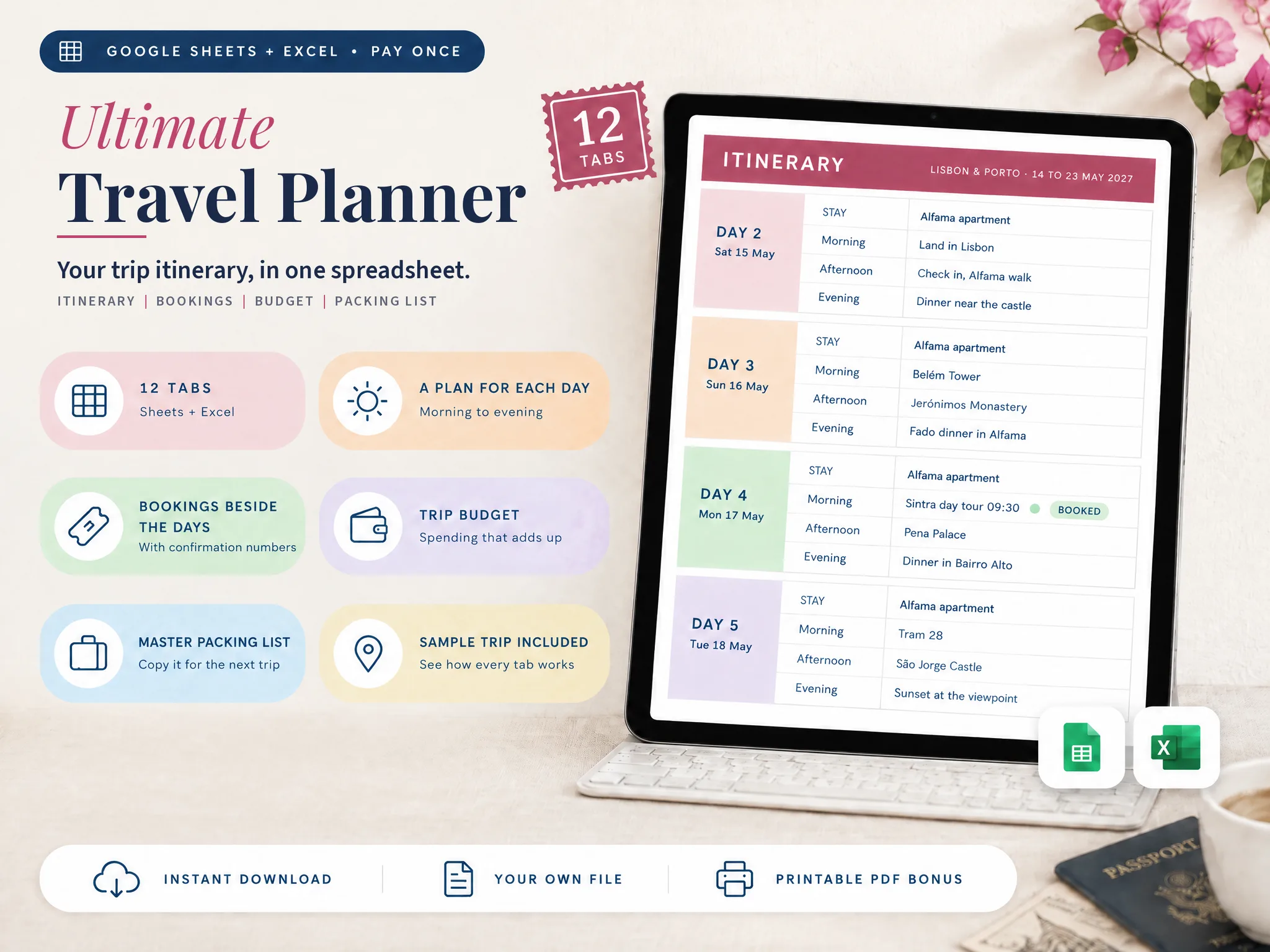
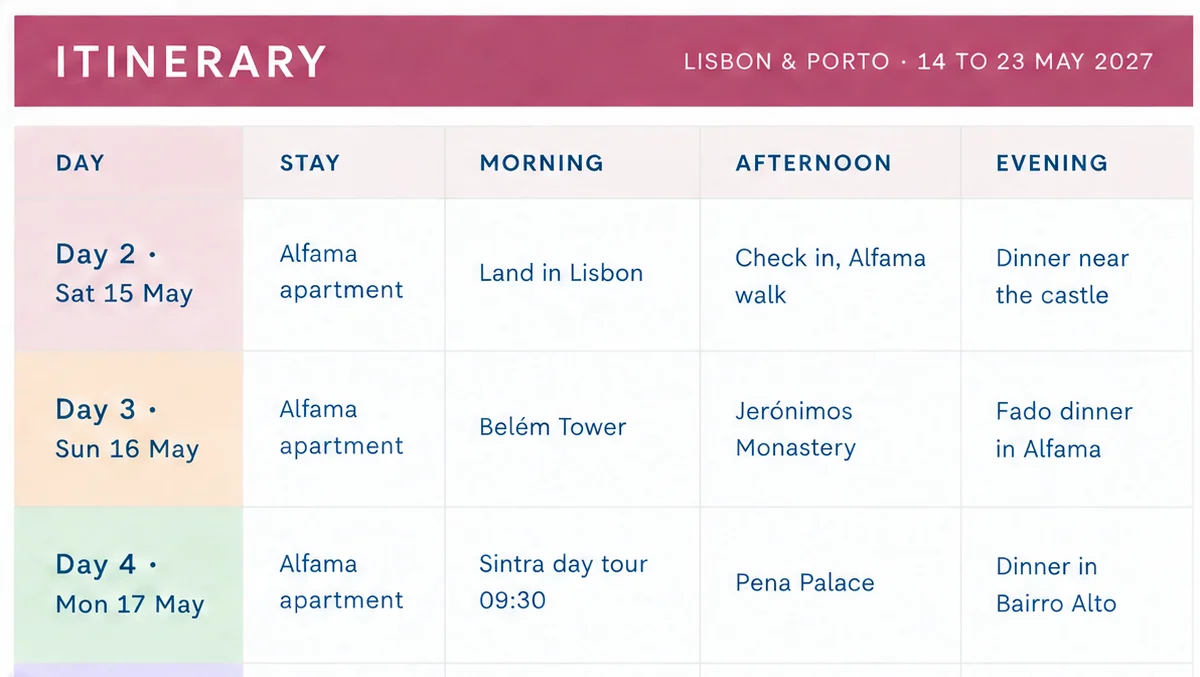
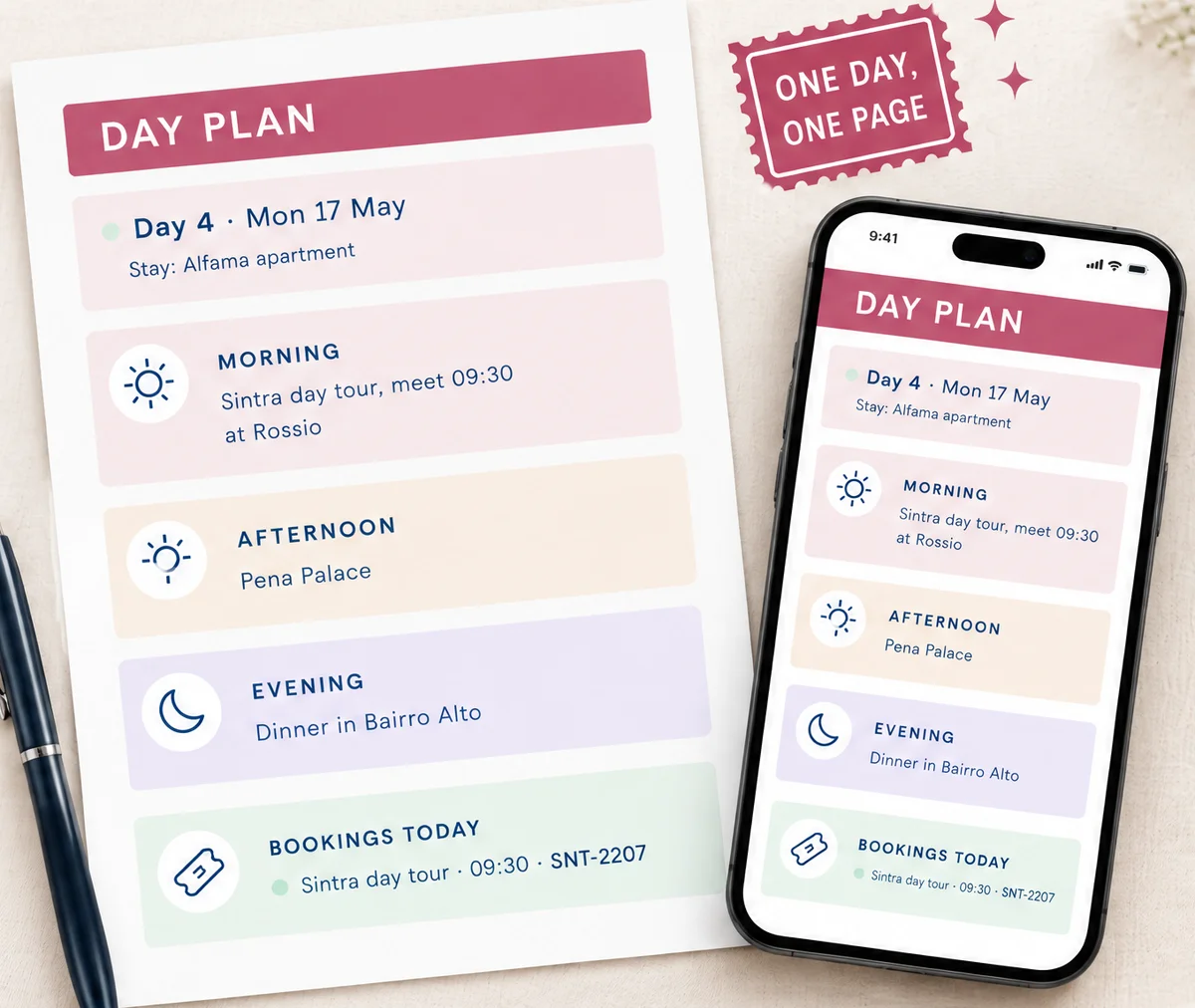
[Original data] Here is what one filled-in day looks like. The sample trip in the Ultimate Travel Planner (ultimatetravelplanner.site) runs 10 days, Friday 14 May to Sunday 23 May 2027. Two travellers, Maya and Sam, are going. Day 4, Monday 17 May, reads like this:
- Stay: Alfama apartment
- Morning: Sintra day tour, meet 09:30 at Rossio
- Afternoon: Pena Palace
- Evening: Dinner in Bairro Alto
- Booked that day: Sintra day tour, 09:30, confirmation SNT-2207
Two things on that block were never typed on the itinerary itself. The apartment name came from the Bookings tab, because the stay runs from 15 to 19 May and day 4 falls inside that range, and the tour with its confirmation number came from the same list. The only text written on the day is the plan around the bookings.
A template that holds up under changes works this way: you enter a booking once, and every place that needs it reads it from there.
Travel Itinerary Templates: Which Fits Your Trip
The formats on offer fall into five groups. None is wrong; they suit different trips.
| Format | Works well for | Where it runs out |
|---|---|---|
| Table in a Word or Google Doc | A weekend with two or three bookings | Dates and costs are retyped by hand |
| Printable graphic (Canva, Pinterest pins) | A single printed day sheet | Hard to edit once printed; one layout per day |
| Notion or similar page | People who already live in that tool | Needs that tool for everyone who travels |
| Blank spreadsheet grid | Anyone happy to build the structure | The structure is your job, and so are the formulas |
| Linked spreadsheet with a sample trip | Multi-stop trips with real bookings | Takes a few minutes to learn the layout |
The more bookings and days a trip has, the more it pays to use a file where the days read from the bookings, while for a weekend a table in a document is plenty.
How to Fill In a Travel Itinerary Template, Step by Step
The order matters more than the template itself, and the steps below work in any spreadsheet. They follow the order in which the sample trip was built.
Step 1: Set the dates and the travellers
Enter the first and last day of the trip and who is going. In the sample, 14 to 23 May 2027 gives 10 days and 9 nights. The date and weekday for each day fall out of that. A template that makes you type "Tue 18 May" on every single row has already given you ten small chances to make a mistake.
Step 2: Add the bookings first
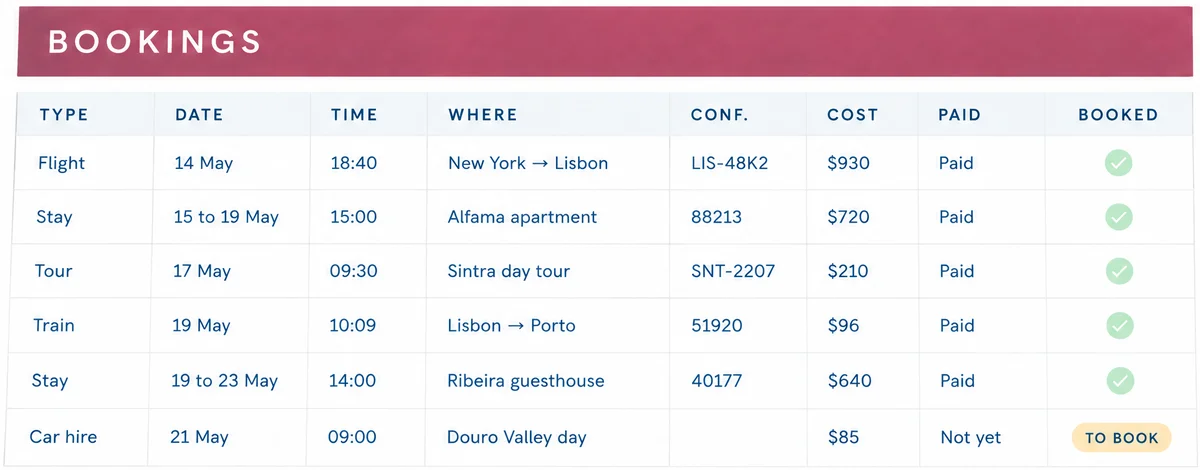
The Bookings tab is a list of everything with a fixed date. Flights, stays, trains, tours and restaurant tables go in before any sightseeing. The sample has nine rows. There are two flights, two stays, a train from Lisbon to Porto, a Sintra day tour, a dinner in Ribeira, a car hire for the Douro Valley and a travel insurance policy. Each has a date, a time, a place, a confirmation number, a cost, and a tick for booked or not yet.
The car hire in the sample is still marked "to book", which is useful on its own, because the list of what remains to be reserved becomes a to-do list that you never had to write.
Step 3: Fill the nights
Once the stays are in, every night has an answer: the Alfama apartment covers nights 2 to 5, the Ribeira guesthouse covers nights 6 to 9, and day 1 is the overnight flight. If a night is blank, you have found a gap in the trip before a hotel front desk found it for you.
Step 4: Block out each day, loosely
Now add the plan, one line for the morning, one for the afternoon and one for the evening. Day 3 of the sample is Belém Tower in the morning, Jerónimos Monastery in the afternoon and a fado dinner in Alfama in the evening. That is three lines, and it is a full day.
Keep it loose, because the most common way an itinerary fails is by being over-scheduled, and a day with three anchors and room around them can survive a late train.
Step 5: Add how you get there
Between stops, note how you move. The sample has the 10:09 train to Porto on day 6, tram 28 on day 5 and a car for the Douro Valley on day 8. One short phrase is enough. It is also where a gap shows up, such as an afternoon in a place that is an hour from the evening's dinner.
Step 6: Check the day against the bookings
Pick any day and look at it on its own page, then check whether it shows the stay, the plan and every booking for that day. In the sample, the Day Plan is a tab that shows one day on a page, which is the version you open on your phone or print. If a booking is missing from that page, it is missing from the trip.
What a Template Needs Beyond the Days
A day-by-day plan is the centre of a trip file, but it is not the entire file. These additional sections earn their space, listed in the order in which they usually matter:
- A trip overview. One screen with the countdown, where you sleep each night and what is still to book.
- A budget that counts the bookings. If booking costs feed their category, the budget is mostly filled in as soon as the bookings are.
- A packing list you keep. The list for this trip should start from the list you built for the last one.
- Documents and contacts. Passport expiry dates, the insurance number and who to call. USAGov also points travellers abroad to travel advisories and the Smart Traveler Enrollment Program (STEP), which is worth a line in this section.
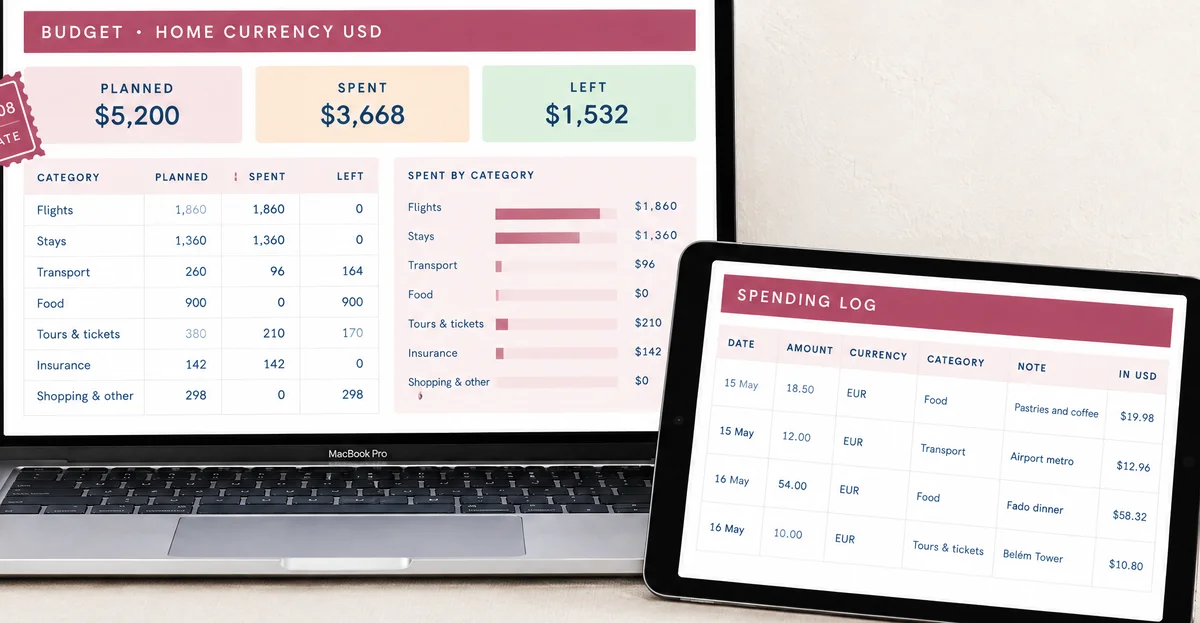
The sample trip shows how little this requires. Its budget has seven categories and a planned total of $5,200, of which $3,668 is already spent on the bookings made so far. That is a sum you can verify by adding up the rows, which is the point, because a total you cannot check is a total you cannot trust.
Money in two currencies
If you travel abroad, you log spending in the trip currency and think in your own. In the sample, the trip currency is euros, the home currency is US dollars, and the rate is typed in as €1 = $1.08. Type your own rate; there are no live rates in the file. A pastries-and-coffee stop of €18.50 becomes $19.98.
Typing the rate is a small chore, but a deliberate one: you choose the rate that matches your card or your cash, and the budget never changes because a number moved overnight.
How Much Detail Your Trip Needs
The same template does not need the same effort for every trip. A rough guide, built from how the sample trip handles it:
| Trip | Fill in | Leave loose |
|---|---|---|
| Weekend, 2 to 3 days | Stay, travel times, one anchor per day | Meals and extras |
| One week, one base | Bookings, nights, an anchor for each day | Free afternoons |
| Ten days, two bases (the sample) | Every booking, the move between bases, each night | Half the evenings |
| Three weeks or more | Bookings and nights for the whole trip, days only for the next week or so | Days far from today |
The longer the trip, the more the template becomes a map of fixed points rather than a detailed script. On the sample, the two fixed points that shape everything are the train to Porto on day 6 and the flight home on day 10. Everything between them moves around those two.
Moving between bases
A trip with two stays, like Lisbon then Porto, has one day that is mostly travel. On the sample that is day 6: the 10:09 train in the morning, check-in at 14:00 at the Ribeira guesthouse, a river walk and dinner. Plan the moving day lightly. The booking carries most of the weight. A heavy sightseeing plan on top of it is how you end up eating dinner at 22:00 in a station.
The first and last day
Day 1 and the final day are the least glamorous and the most heavily booked. On the sample, day 1 is an overnight flight and day 10 is "check out, flight home 12:15", but both still get a full block, because they hold the times you cannot afford to miss.
Five Mistakes That Break an Itinerary
Most itineraries fail in the same few ways, and each one is easy to check for once you know what to look for.
- Planning the days before the bookings. The sightseeing you wrote for Tuesday lands on the day you are on a train.
- Typing the same fact twice. An address in three places becomes three versions the week a booking changes.
- No "to book" marker. The car hire is still not reserved the night before, and nothing on the page says so.
- Every hour filled. One late connection and the whole day falls like a row of dominoes.
- No copy of the clean version. The next trip starts from the last trip's mess.
None of these mistakes requires special software to fix. They require a plan built outward from the bookings, and a habit of examining one day at a time on its own page before you travel.
Printing and Sharing the Plan
Most people want the finished plan in three places: on a phone, on paper and in the hands of whoever is travelling with them.
The phone version should be one day on a screen, not the whole grid. Scrolling a wide sheet on a train gets old quickly. The paper version should be one day on one page, with the confirmation numbers on it, in case the battery dies at the hotel desk. And the shared version should be the same file rather than a separate export, so that there is only one plan to update, with Drive access levels deciding who can change it.
On the sample trip, that is the Day Plan: you choose a day from a dropdown, and it shows that day's stay, plan and bookings. Print it or open it in the Google Sheets app. Because every day uses the same page layout, the paper copies stack in order, which makes it simple to hand a day to a travelling companion, and version history keeps a record of changes.
The Part Most Templates Leave Out
[Unique insight] Most templates give you somewhere to write a plan but no way to keep it accurate once the trip starts changing.
Three habits do that work, and none of them depends on a particular tool or app:
- One source for each fact. A hotel address lives in one cell. Every other mention points to it.
- A "to book" marker. Anything planned but not yet booked is visible, so you do not arrive at a ticket queue by surprise.
- A clean copy. Keep an untouched copy of the template and make a fresh one for every trip. Overwriting last year's file is how old bookings end up in new plans.
If you share the file, version history in Google Sheets shows who edited what, with a colour for each person. That settles the "who moved dinner?" question.
Why Trust This Article
The Cosmo Suite team wrote this guide. We also built the Ultimate Travel Planner, so we are not neutral about spreadsheets for trip plans. We have said where a plain document is the better choice. Our methodology is plain: we counted every figure from the file's own sample copy, which has 10 days, nine bookings and a $5,200 planned budget. The Google Drive sharing and version history details were checked on 5 October 2026. You can read about us and the company behind this site and our editorial policy. Check your own booking times and documents before you travel.
Where the Ultimate Travel Planner Fits
The trouble this article keeps coming back to is that a plan and the bookings behind it live in different places. The Ultimate Travel Planner at ultimatetravelplanner.site is a trip itinerary spreadsheet built around that problem, with 12 connected tabs in Google Sheets and Excel.
You enter the dates, travellers and bookings once. The Itinerary fills in each day's date and where you stay that night. The Day Plan shows one day on a page with its bookings. The Budget counts booking costs toward their category. The Master Packing List seeds a list for each traveller, up to eight. Trips can run to 60 days. Each file comes as a filled-in sample (the Lisbon and Porto trip above) and a clean copy. Two printable PDF pages come too: a one-day plan and a packing checklist.
It does not import bookings from your email, it books nothing, and the exchange rate is the one you type in. If you want a ready-made trip itinerary spreadsheet with your bookings beside each day, that is what it is for. It is one file you own, paid for once at $9. If a table in a document does the job for your trip, use that and keep the method above.
Frequently asked questions
What should a travel itinerary template include?
A block for every day with a morning, an afternoon and an evening, where you sleep that night, and the times and confirmation numbers for anything booked. Add a place for how you get from one stop to the next. Budget, packing and documents can live on their own tabs, as long as the days stay the centre of the file.
Is a Google Sheets itinerary template better than a Word or Docs table?
It depends on what you want the file to do. A document table is fine for a weekend away with two bookings. A spreadsheet earns its place once dates, bookings and costs need to agree with each other, because the days can read from the bookings instead of you retyping them.
How detailed should each day be?
Detailed enough that you could hand it to a travel companion and they would know where to be at each point. One line each for morning, afternoon and evening, plus a time on anything booked, is usually enough. Leave gaps on purpose; a day with every hour filled tends to fall apart by lunchtime.
Can I use one template for several trips?
Yes, if you copy the whole file for each trip rather than overwriting the last one. Keep a clean copy untouched, make a fresh copy per trip, and anything you want to carry forward, such as a packing list, stays in the file you copy.
Does the Ultimate Travel Planner work in Excel as well as Google Sheets?
Yes. It comes as a Google Sheets file and as an Excel file made for Microsoft 365, each as a filled-in sample trip and a clean copy. Google Sheets needs a free Google account to make your own copy, and setup is easiest on a computer.