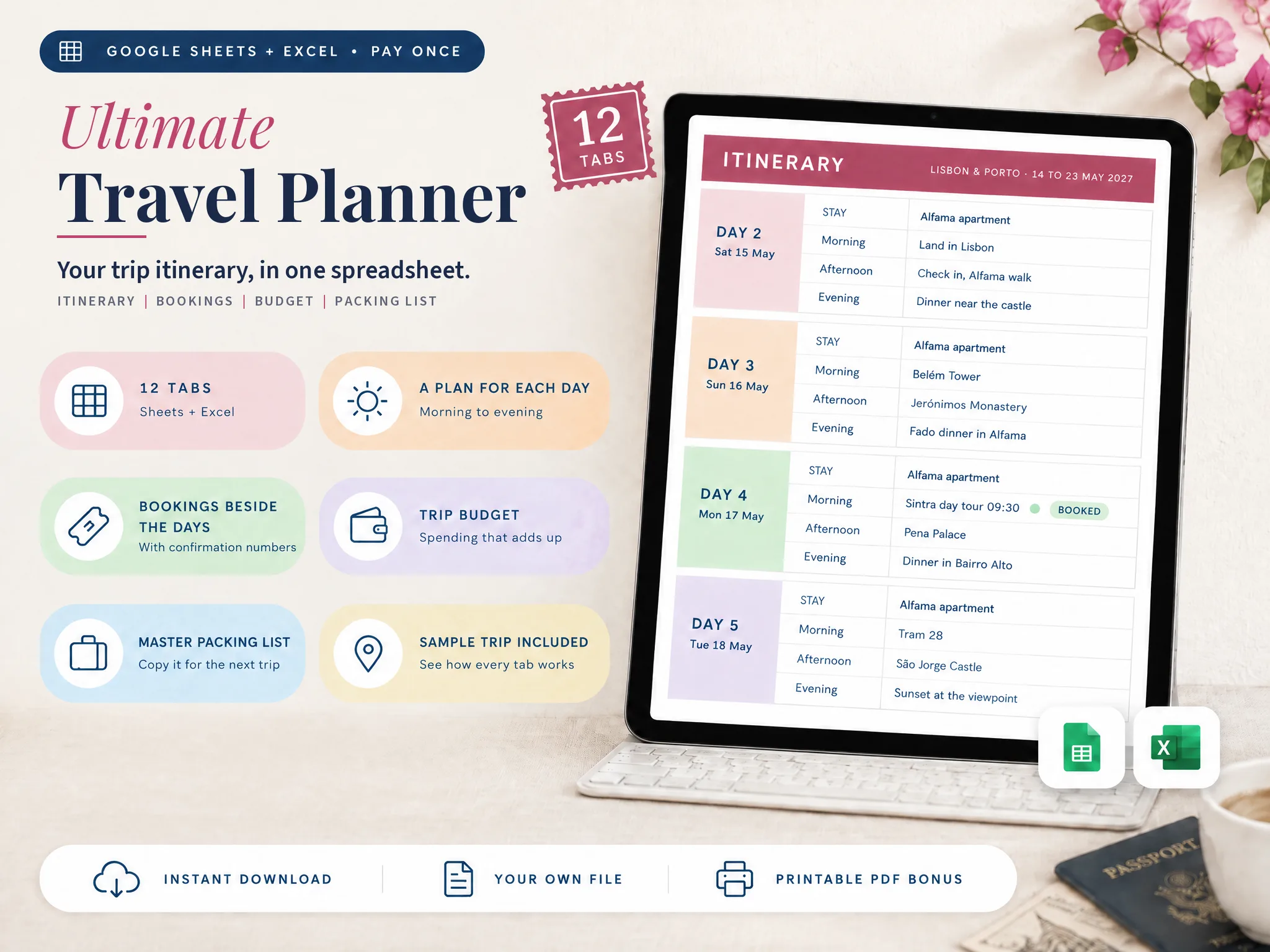
Travel Planner Spreadsheet: The 12 Tabs a Trip Uses (and the 4 You Can Skip)
Travel planner spreadsheet tabs explained: which of the 12 a weekend trip needs, which a 3-week trip needs, and the 4 you can skip, on a sample trip.
By Ultimate Travel Planner by Cosmo Suite · Editorial policy
Published · 7 min read

You open a spreadsheet to plan a weekend away and find twelve tabs. Half of them look like they belong to a trip three times as long as yours.
That is the usual problem with a travel planner spreadsheet. The free ones tend to be either a single sheet that runs out on day four, or a big workbook that asks for more than your trip has to give. The pages that rank for this search are mostly template downloads and personal write-ups.
The short answer: use the tabs that carry your bookings and your days, and skip the rest until the trip is big enough to need them. Here is which of the 12 tabs in our sample file do what, and which four a short trip can leave blank.
The Plan in Brief
- Every trip needs three things: dates and travellers, bookings, and a plan for each day.
- Eight of the 12 tabs suit a weekend trip. Four can stay blank.
- A 3-week trip uses all 12, mainly for the budget, the packing lists and the documents.
- Hide a tab you do not use. An empty tab is clutter rather than a to-do, and hiding it keeps the file easy to read.
What a Travel Planner Spreadsheet Is For
A travel planner spreadsheet is a workbook that keeps everything about one trip in one file: when you go, who goes, what is booked, what you do each day, what it costs and what you pack. It replaces the notes app, the folder of confirmation emails, and the screenshot of a hotel address that you can never find when you need it.
The test of a good one is simple. Pick any night of the trip and ask yourself where you sleep and what is booked that day. If you can answer in a few seconds, the sheet works. If you have to search three different places before you know, it is just a list with extra steps.
The sample file we use below is a trip itinerary spreadsheet with 12 connected tabs, filled in with a 10-day trip to Lisbon and Porto for two travellers. "Connected" means a fact typed on one tab shows on the others. The stay you enter in Bookings appears on its nights in the Itinerary. The booking costs count toward the Budget. That connection is the reason the order in which you fill the tabs matters more than how many there are.
A Day From the Sample Trip
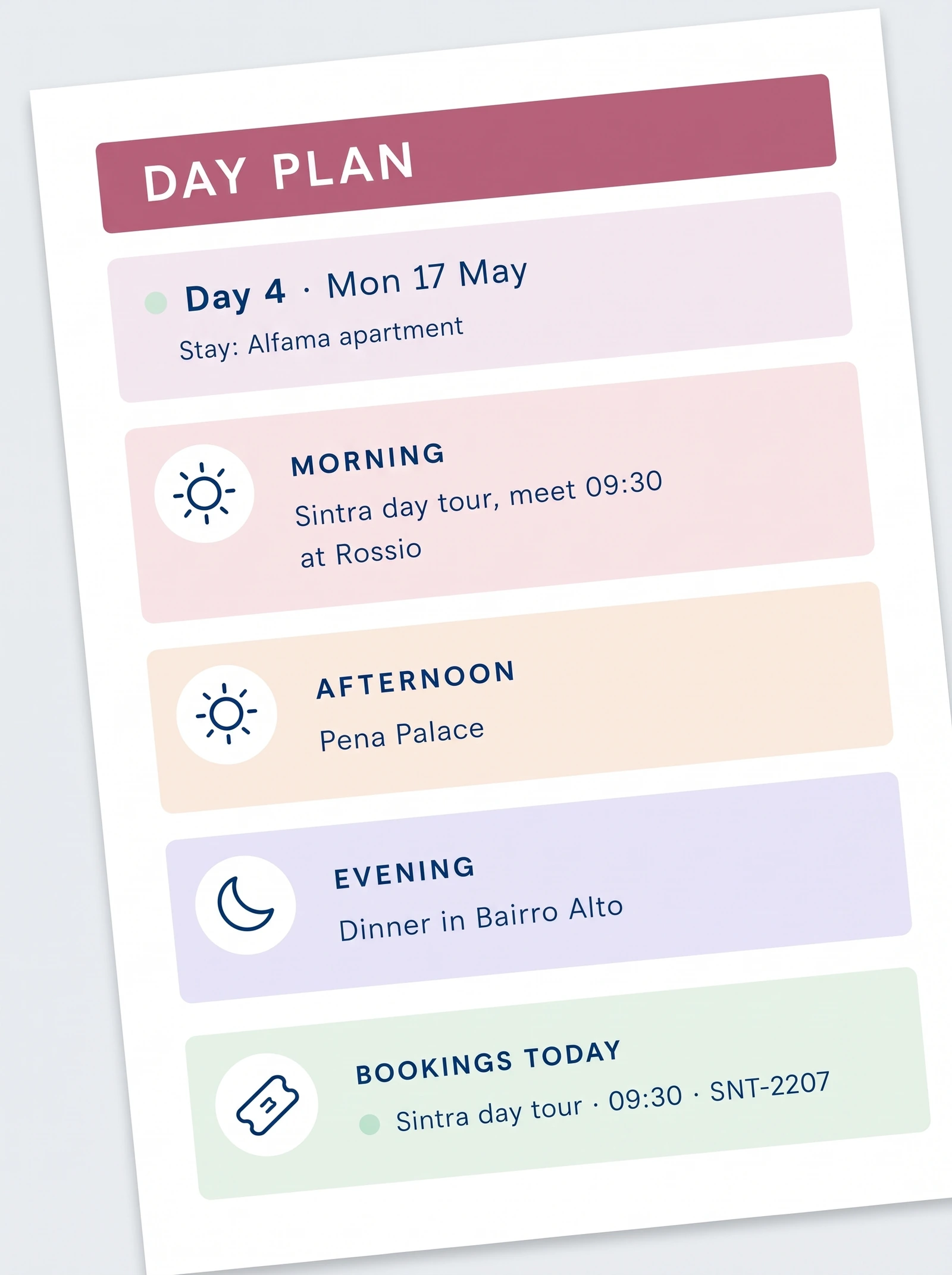
[Original data] For example, take day 4 of the sample trip, Monday 17 May. The Itinerary tab shows the stay (Alfama apartment) and three lines: the Sintra day tour at 09:30, Pena Palace in the afternoon and dinner in Bairro Alto. The Day Plan tab shows the same day on a page of its own, with the booking beside it: Sintra day tour, 09:30, confirmation SNT-2207.
None of that was typed twice. The tour lives in Bookings once, and the day pulls it in. What happens when the operator moves the tour to 10:00? You change one cell, and both the Itinerary and the Day Plan follow, because there is only one place where a changed time has to be fixed.
Travel Planner Spreadsheet Tabs: Which Fit Your Trip
This table is our judgment, made on the sample file. It is not survey data. A weekend here means two or three nights in one place with one or two travellers. A 3-week trip means several stops and a budget you want to watch.
| Tab | What it holds | Weekend | 3-week trip |
|---|---|---|---|
| Start Here | Trip name, dates, travellers, rate | Use | Use |
| Trip Overview | Countdown, bookings, budget left | Use | Use |
| Itinerary | One block for each day | Use | Use |
| Day Plan | One day on one page | Use | Use |
| Bookings | Every booking with its number | Use | Use |
| Budget | Planned, spent and left | Use | Use |
| Master Packing List | The list you keep | Use | Use |
| Before You Go | Checklist by timeframe | Use | Use |
| Places & Ideas | Places to add to a day | Skip | Use |
| Spending Log | What you spend, in either currency | Skip | Use |
| Packing by Traveller | A list for each person | Skip | Use |
| Documents & Contacts | Passport dates, insurance, contacts | Skip | Use |
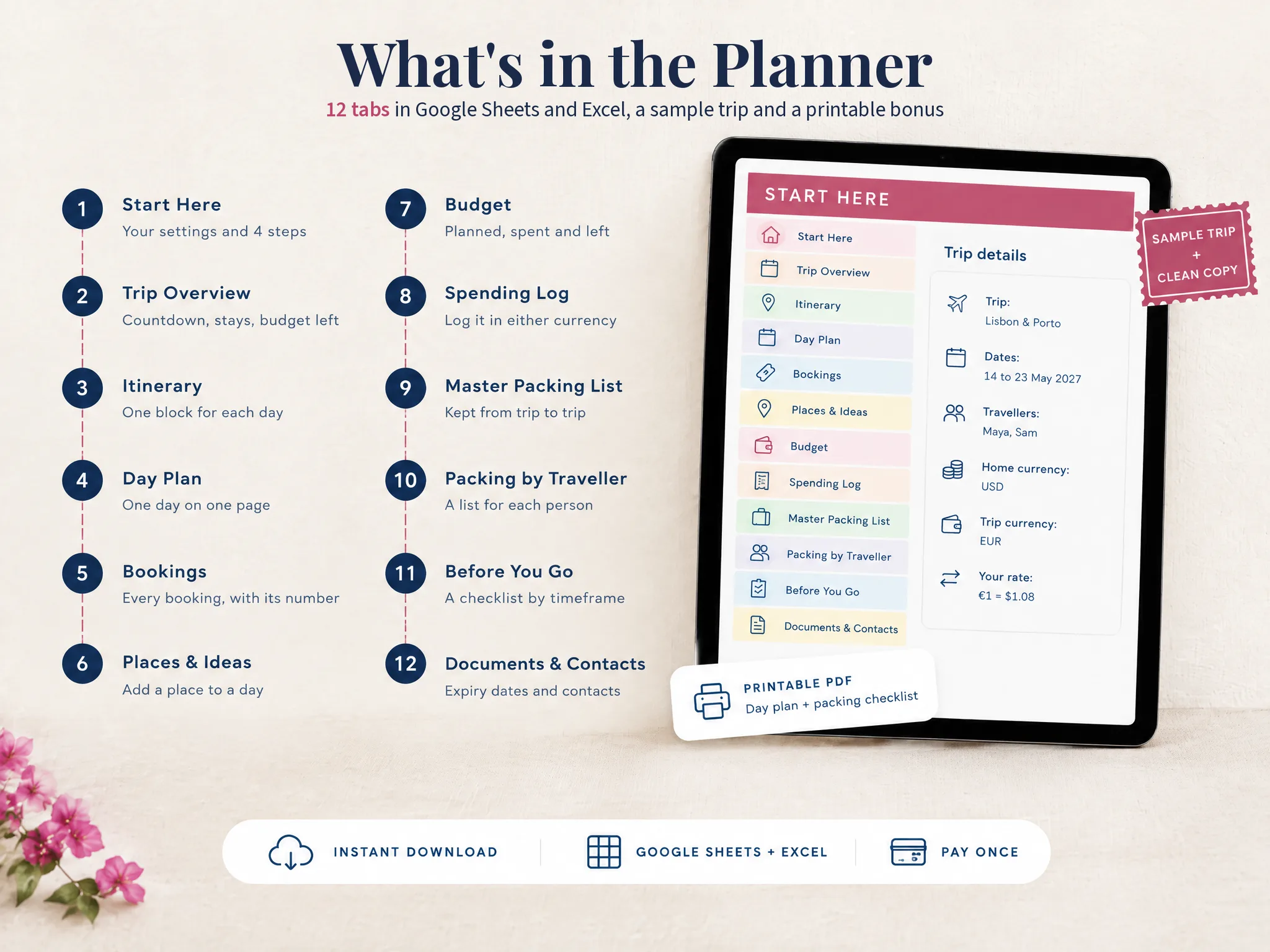
Read the table down the two columns. The first eight tabs are the plan itself, while the last four are bookkeeping for a bigger trip. On a short trip with one traveller, a place list and a spending log cost more effort than they return, which is why we mark them as skippable.
The Eight Tabs Most Trips Use
Each of these earns its place on a trip of any length.
Start Here and Trip Overview: the settings and the glance
Start Here holds the trip name, the dates and who is going. In the sample, that is Lisbon and Porto, 14 to 23 May 2027, for Maya and Sam. Every date and weekday in the file follows from those entries. Trip Overview then shows the countdown, the bookings and what is left in the budget on one screen.
Bookings, Itinerary and Day Plan: the core
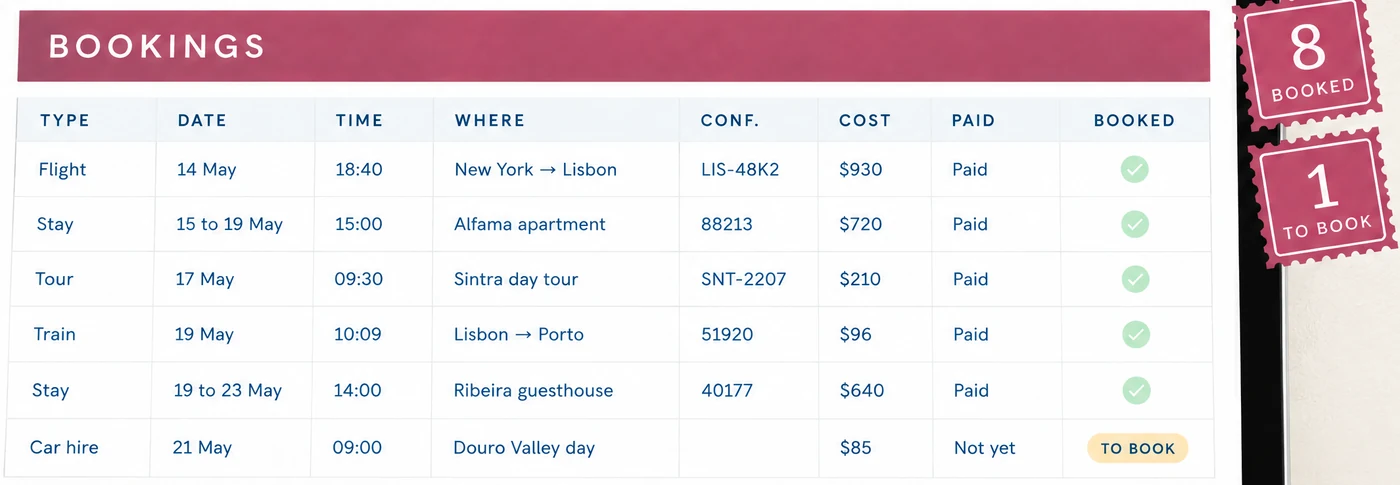
Enter the bookings first. The sample has nine: two flights, two stays, a train, a Sintra tour, a dinner, a car hire and an insurance policy. Eight are booked and the car hire is marked to book, which is a reminder you did not have to write. Consider what that saves you on the night before departure. The Itinerary then gives each day a morning, an afternoon and an evening, and fills in where you sleep from Bookings. The Day Plan is the same day on one page, for your phone or a printout.
Budget, Master Packing List and Before You Go: the small trip's extras
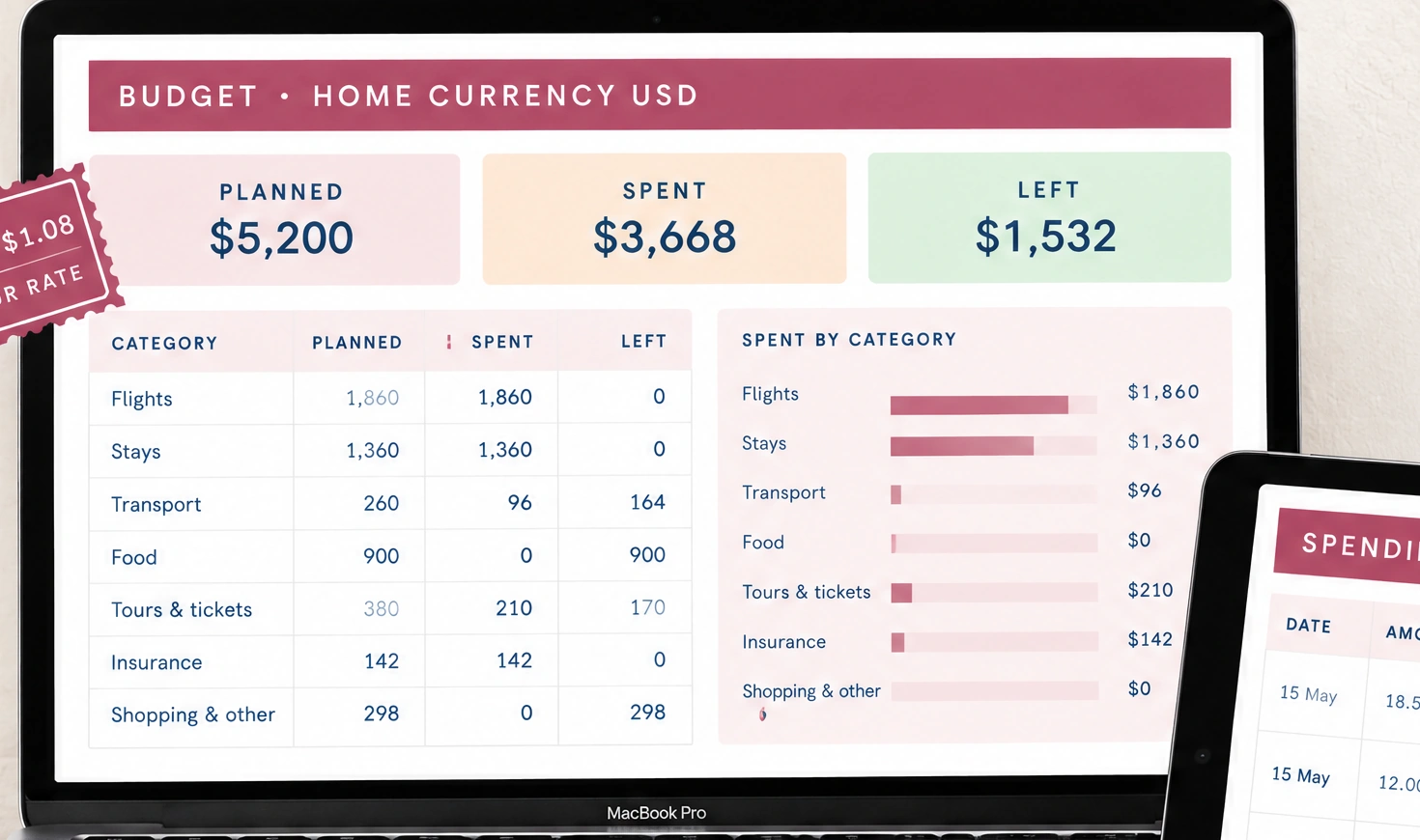
These three take little time to keep up, and forgetting them is expensive. In the sample, the Budget adds up to $5,200 planned, $3,668 spent and $1,532 left, and the booking costs land in their categories without retyping. The Master Packing List is the one list you keep and copy to the next trip, which makes it unusual among the tabs. Before You Go splits the chores into when you book, a month before, a week before, the day before and travel day, such as checking passport expiry dates.
The Four Tabs a Short Trip Can Skip
A skipped tab only means the trip has not grown into it yet.
- Places & Ideas: a holding area for sights you may add to a day. Useful when you are choosing among a dozen; a waste when you already know the plan.
- Spending Log: where you log each purchase in the trip's currency, which converts at the rate you typed in. On a weekend at home you will check one card statement instead.
- Packing by Traveller: gives each person a list that starts from the master list. For one traveller the master list is enough.
- Documents & Contacts: passport expiry dates, the insurance number, an emergency contact. Skippable at home, but on a trip abroad it is the tab you will want most, for instance when an insurance number is needed at a clinic. USAGov also points U.S. citizens to travel advisories and the Smart Traveler Enrollment Program, which is worth a line there.
Skip these four until the trip crosses a border, a currency or a second traveller, and bring them in then.
What Matters More Than the Tab Count
[Unique insight] Most advice about a travel planner spreadsheet covers layout, meaning which columns and which colours. Three habits matter more than that.
- Bookings before plans. The fixed dates decide what is left for sightseeing.
- One fact, one place. A hotel address in three cells becomes three versions the week a booking changes.
- Check one day on its own page. Open the Day Plan before you travel. If a booking is missing there, it is missing from the trip.
So how big should the sheet be? A sheet built this way stays small when the trip is small and grows when the trip does. Share it with the people going from Drive, as Google's sharing guide describes, and give most of them view-only access.
Why Trust This Article
The Cosmo Suite team wrote this guide and built the Ultimate Travel Planner, so we are not neutral about spreadsheets. Our methodology was to count every figure in the file's own sample copy, which has 10 days, nine bookings and 12 tabs. The weekend and 3-week split is our own judgment on that file, not a survey. We did not time a setup, so we make no claim about how long it takes. Google's help pages and USAGov were checked on 8 October 2026. See about us and our editorial policy, and check your own booking times before you travel.
Where the Ultimate Travel Planner Fits
The Ultimate Travel Planner at ultimatetravelplanner.site is the sample file above, sold as a ready-made travel planner spreadsheet with 12 tabs in Google Sheets and Excel. Each version comes as a filled-in sample trip and a clean copy, plus two printable PDF pages: a one-day plan and a packing checklist.
You enter the dates, the travellers and the bookings once, and the Itinerary, Day Plan, Budget and packing lists fill from them. Trips can run to 60 days and 8 travellers. Start with the clean copy, keep the sample open beside it, and hide the tabs your trip does not need.
It does not import bookings from email, it books nothing, and the exchange rate is the one you type. To make your own copy of a Google Sheets file, Google's help page shows the steps. For the full method, read the travel itinerary template guide, or the Google Sheets setup, step by step. It costs $9 once. If a free grid does the job for your trip, use that and keep the order above.
Frequently asked questions
What should a travel planner spreadsheet include?
At minimum: your trip dates and travellers, a list of bookings with confirmation numbers, and a day-by-day plan. Add a budget and a packing list when the trip is long enough to need them. Everything else is optional.
Is a spreadsheet better than a travel app?
It depends on the trip. An app is better for maps and for pulling bookings from email. A spreadsheet is better when you want one file you own, laid out the way you think, with nothing to renew.
How many tabs is too many?
More than you will open. A weekend trip does well with about eight. A three-week trip with a budget to watch can use all twelve. If a tab sits empty for the whole trip, hide it.
Can I use a travel planner spreadsheet on my phone?
Yes, with the Google Sheets app or the Excel app. Wide grids are hard to read on a small screen, so keep one tab that shows a single day. Do the setup on a computer.
Do I need a separate spreadsheet for each trip?
Yes, one copy per trip. Keep the original clean and copy it when you plan the next trip. A master packing list is the one part worth carrying from trip to trip.
Sources
Keep reading
Itinerary Templates
Travel Itinerary Template: What a Day-by-Day Plan Needs (and a Sample Trip, Filled In)
Travel itinerary template: what a day-by-day plan needs, how to fill one in, and a sample 10-day trip to Lisbon and Porto worked from morning to evening.
· 12 min read

Itinerary Templates
Travel Itinerary Template for Google Sheets: Set Up a Trip, Step by Step
Travel itinerary template Google Sheets setup: six steps from your own copy to the Day Plan on your phone, worked on a 10-day Lisbon and Porto trip.
· 7 min read